Basic Animation Techniques for Automotive Prototyping using Unreal Engine
Getting Started with Unreal Engine: Blueprints and Timelines
Taking the first step into automotive prototyping is significantly simplified with Unreal Engine, a robust platform that revolutionizes how designers bring their ideas to life. As you start, two key elements will become your go-to tools: Blueprints and Timelines. Blueprints serve as the visual scripting system in Unreal Engine, allowing for intuitive yet complex logic and behavior design. At the same time, Timelines are essential for creating animations and time-based changes in a straightforward, easily adjustable manner. These foundational components work harmoniously to streamline the prototyping process, offering a combination of flexibility and control vital for rapid and efficient development.
Animation Sequencer Overview
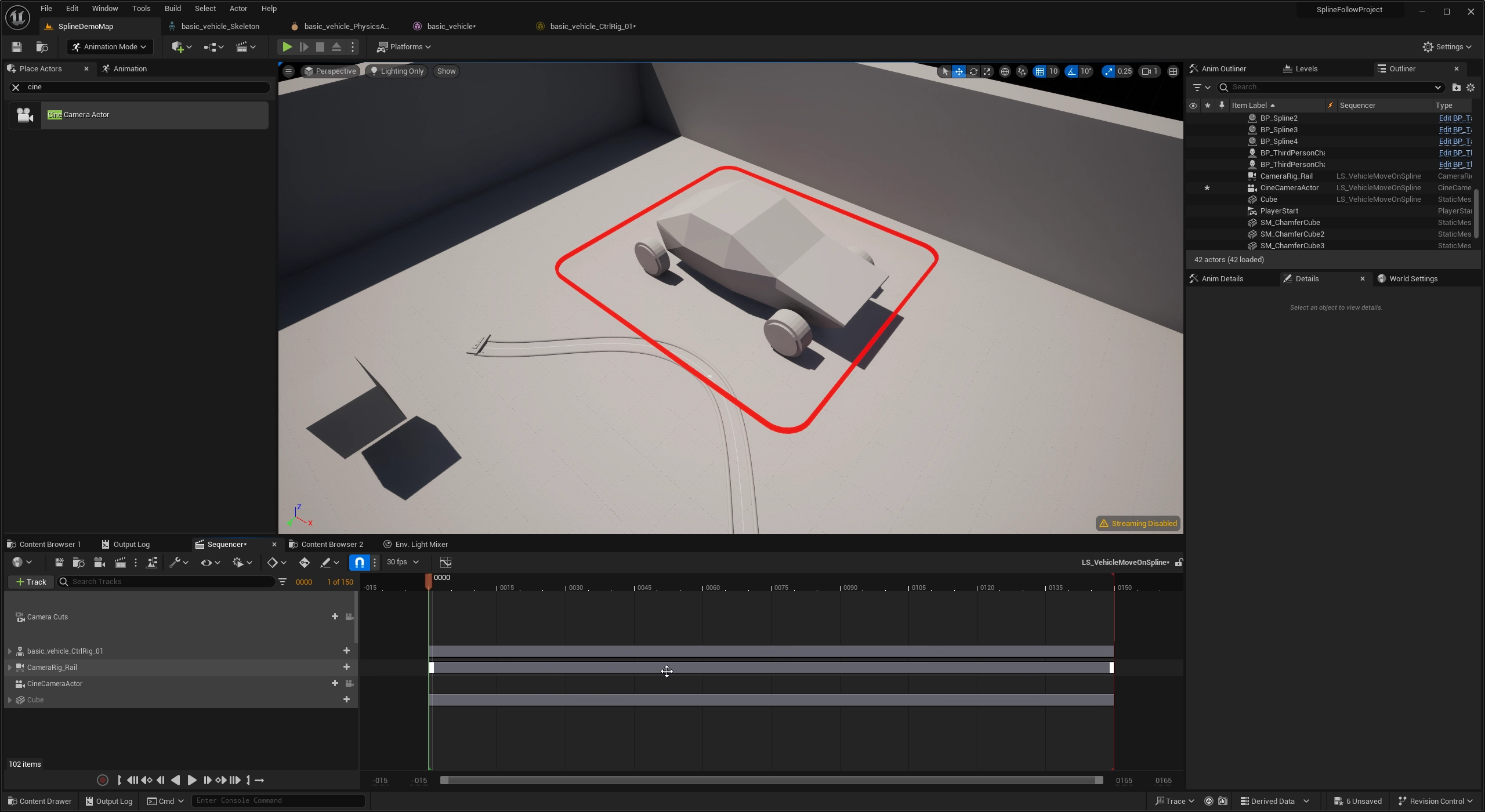
When diving into automotive prototyping, understanding various animation techniques is crucial, and the Sequencer in Unreal Engine is your central hub for this endeavor. The Sequencer is a powerful tool that allows for editing and controlling animations, providing an intuitive and comprehensive timeline-based interface. This feature lets the 3D artist or Designer layer various animation techniques, from simple keyframes to complex motion captures, all within a single cohesive environment. By mastering the Sequencer, you can bring unprecedented detail and realism to your automotive prototypes, enhancing both the design process and the final result.
Keyframes in Unreal Engine
In Unreal Engine, keyframes are building blocks for creating intricate animation sequences. These keyframes are specific points on the timeline that define an element’s position, rotation, or other properties at a given moment. Setting up keyframes at various intervals allows you to control how an object transitions from one state to another over time, providing you with granular control over animation sequences. The utility of keyframes in Unreal Engine is significant; they enable you to create dynamic, highly customizable animations that can bring your automotive prototypes to life visually compellingly. That said, most simple animation for vehicle movement can be done with only keyframes, yet there are more elegant and practical manners to approach the subject. Hence, we will discuss using the spline component in a sequencer with a control rig.
Mastering Animation Using Splines for Sequences
Mastering splines in conjunction with sequences and timelines can drastically elevate the quality and complexity of your animations in Unreal Engine. Splines allow for the creation of smooth, curved paths that objects can follow, offering unparalleled control over movement and transitions. By integrating splines into your sequences, you can produce far more natural and intricate animations, whether it’s the trajectory of a car in a simulation or the movement of components in automotive prototyping. When splines are mapped onto timelines, they enable precise timing and coordination of complex animation sequences, providing a seamless and dynamic user experience. Subscribe to my newsletter as I will have a step-by-step tutorial on using a control rig and spline to animate/control vehicle movement from a sequencer instead of traditional baked animation from the Design content creation (DCC) tools.
Enhance Design Review with multi-camera setup
Incorporating multiple cameras in Unreal Engine can significantly enhance the design review process in automotive prototyping. By setting up various cameras at different angles and perspectives, teams can examine a vehicle’s design more comprehensively. This multi-camera setup allows for a 360-degree view of the model, making it easier to spot design inconsistencies, understand aerodynamic flow, or appreciate the aesthetics from multiple vantage points. Being able to toggle between different camera perspectives during a design review ensures all details are shown, thereby elevating the quality and accuracy of the final prototype.
Troubleshooting Common Issues
Troubleshooting, or debugging, is essential to working with Unreal Engine, especially when intricate animation techniques are involved in automotive prototyping. Encountering common issues like rendering errors, animation glitches, or compatibility problems is common. Having a structured problem-solving approach can save you both time and resources. Whether debugging your Blueprints or deciphering error messages, being adept at identifying and resolving these issues will streamline your workflow and reduce downtime. Knowing where to look for solutions—whether in the documentation, online forums, or through expert consultation—can make the troubleshooting process far less daunting. We will also touch on some of the troubleshooting techniques in the videos.
Case Studies: Real-World Applications
A significant OEM in North America (let’s say company ABC) wanted to accelerate its design and development process for a new line of electric vehicles. The traditional design process was iterative but needed real-time collaboration between design, engineering, and manufacturing teams.
Company ABC leveraged Unreal Engine for its state-of-the-art real-time rendering and collaboration capabilities. 3D Artists and Creative technologists in their visualization department used Unreal Engine to create highly detailed, animated models of the new electric vehicles, complete with intricate lighting, materials, and aerodynamics simulations.
Fast forward, this workflow-enabled company ABC’s global teams to collaborate in unprecedented ways. The method helped the company shorten its product development cycle by several months and allowed for quicker iterations based on real-time feedback from different departments, including engineering and manufacturing. The high-fidelity visualizations and animations created in Unreal Engine also facilitated investor presentations and marketing initiatives, making it easier to secure further funding and build consumer anticipation.
Conclusion:
As this blog post elucidates, animation is a pivotal element in modern automotive prototyping, and Unreal Engine serves as a quintessential platform for this purpose. From the initiation stage, using Blueprints and Timelines, to creating sophisticated animations through Sequencers, keyframes, and splines, Unreal Engine provides a complete toolkit for animating automotive prototypes at unparalleled detail and realism.
Moreover, our case study with a major OEM demonstrates the practical implications of employing advanced animation techniques in Unreal Engine, proving its capability to streamline workflows and accelerate product development. Mastering these animation techniques in a rapidly evolving industry can give your automotive prototypes a significant edge.
Animation isn’t just a feature; it’s an integral part of the design process, influencing everything from design review perspectives to troubleshooting methods. As you delve deeper into automotive prototyping, consider the endless possibilities that animation in Unreal Engine can unlock.